Guía práctica para detectar VPS sobreexplotados: Steal Time y caída abrupta de la caché de disco
La sobreexplotación es un fenómeno común en la industria de VPS, pero un exceso de sobreexplotación afecta significativamente el rendimiento. Este artículo ofrece un conjunto de métodos prácticos de detección desde dos dimensiones: Steal Time de CPU y la caída abrupta de la caché de disco, para ayudarle a determinar si un VPS está excesivamente sobreexplotado y proporcionar estrategias de respuesta.
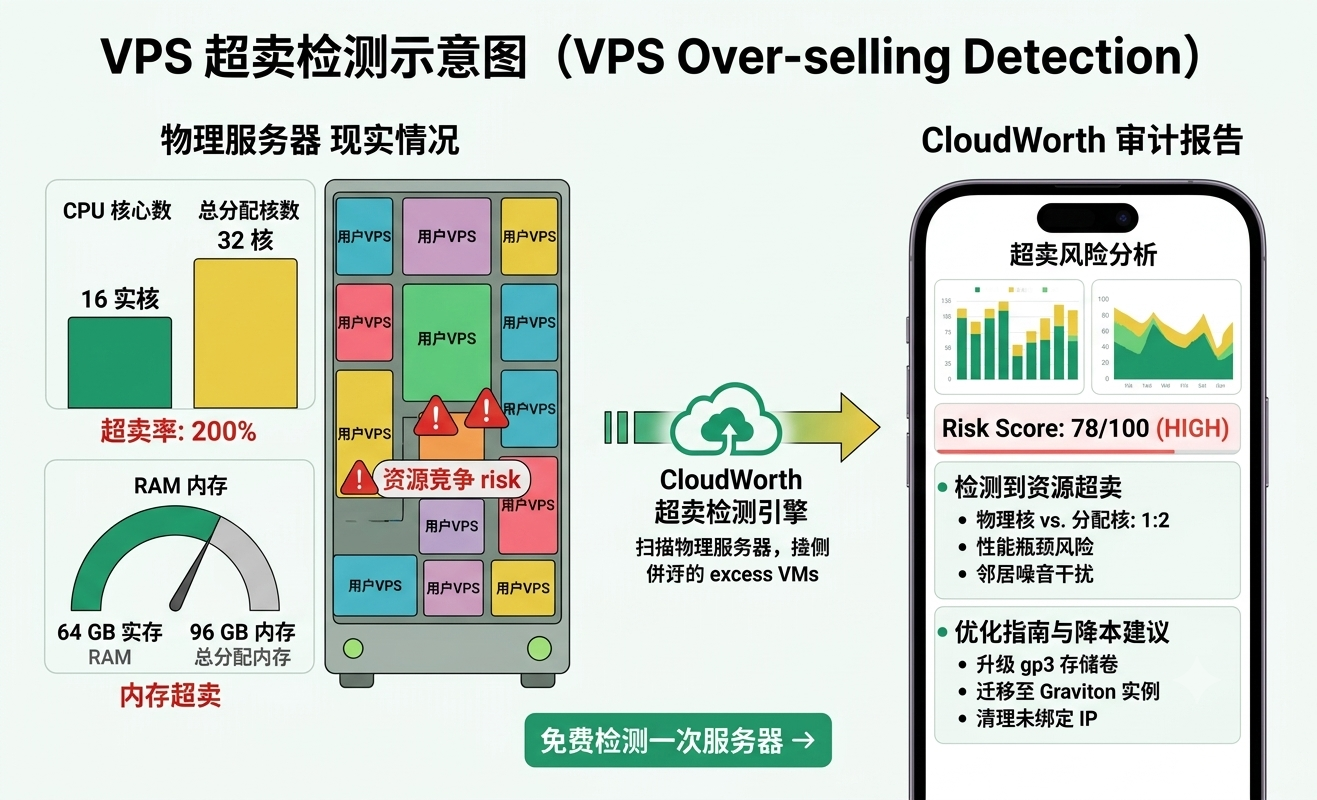
Al monitorear continuamente el Steal Time de CPU y las caídas en la caché de disco, junto con pruebas de estrés, se pueden identificar eficazmente los VPS excesivamente sobreexplotados, detener pérdidas a tiempo y optimizar la estrategia de implementación.
¿Por qué es necesario detectar la sobreventa de VPS?
Los VPS (Servidores Privados Virtuales) se basan en la tecnología de virtualización para dividir los recursos del servidor físico. La sobreventa (Overselling) se refiere a la práctica, común en la industria IDC, en la que la suma de los recursos virtuales vendidos por el proveedor supera el límite de los recursos físicos. Una sobreventa razonable puede reducir costos, pero una sobreventa excesiva puede provocar contención de CPU, picos de latencia de E/S de disco e incluso problemas de "ruido de vecinos".
Como usuarios, no podemos ver directamente la configuración de sobreventa del proveedor, pero podemos inferirla indirectamente a través de los patrones de cambio de las métricas del sistema. Entre ellos, CPU Steal Time y el precipicio de caché de disco son las dos señales más directas y efectivas.
Métrica clave 1: CPU Steal Time (tiempo hurtado)
¿Qué es Steal Time?
En los sistemas Linux, el campo steal o st representa el porcentaje de tiempo en que la CPU de la máquina virtual es ocupada por el hipervisor (host). Cuando los recursos de CPU física son insuficientes, el hipervisor fuerza la programación, lo que hace que tu VPS no obtenga el tiempo de CPU que le corresponde. Ese tiempo de espera es Steal Time.
¿Cómo ver Steal Time?
Usa el comando top, mira el valor st en la línea %Cpu(s):
top -n 1 | grep '%Cpu'Ejemplo de salida:
%Cpu(s): 5.1 us, 2.0 sy, 0.0 ni, 92.0 id, 0.0 wa, 0.9 hi, 0.0 si, 0.0 stEl st aquí es Steal Time. También puedes usar el comando vmstat, prestando atención a la columna st (requiere permisos de root):
vmstat 1 5Umbrales de evaluación
- Superior al 5% de forma continuada: indica que la CPU del host está sobrecargada y tu VPS comienza a verse afectado.
- Picos superiores al 10%: puede haber una degradación notable del rendimiento, especialmente en tareas que requieren cómputo continuo.
- Superior al 20% durante un período prolongado: se trata de una sobreventa grave; se recomienda considerar cambiar de proveedor.
Simulación de pruebas de estrés
Simplemente mirar el Steal Time en reposo puede no ser evidente. Se recomienda usar la herramienta stress para simular carga de CPU y observar el comportamiento del Steal Time bajo presión:
# 安装stress(Debian/Ubuntu)
apt install stress -y

# 满载所有CPU核心60秒
stress --cpu $(nproc) --timeout 60 &

# 同时运行top观察
sleep 5 && top -d 2 | grep '%Cpu'
Si el valor de st se dispara en estado de carga completa, significa que los recursos físicos de CPU han sido ocupados en gran medida por otras VPS, y hay sobreventa severa.
Indicador principal 2: Precipicio de la caché de disco
¿Qué es el acantilado de caché de disco?
El rendimiento de E/S del disco de una VPS depende en gran medida de la caché en la memoria del host. Cuando hay acierto de caché, las velocidades de lectura y escritura son extremadamente rápidas; cuando hay fallo de caché (especialmente con ráfagas de lectura/escritura), la velocidad del disco físico se convierte en el cuello de botella, y el rendimiento cae varios órdenes de magnitud, formando un “acantilado”.
Si hay demasiadas VPS ejecutándose en el host, la proporción de caché disponible para cada VPS se reduce, lo que hace más fácil desencadenar el efecto acantilado.
¿Cómo detectar una caída abrupta de la caché del disco?
Utiliza hdparm o dd para probar la velocidad de lectura/escritura del disco y observa las fluctuaciones de velocidad.
1. Prueba simple:
# 写入测试(512MB文件)
time dd if=/dev/zero of=testfile bs=1M count=512 conv=fdatasync

# 读取测试(清缓存后)
echo 3 > /proc/sys/vm/drop_caches   # 需要root,清Page Cache
time dd if=testfile of=/dev/null bs=1M count=512
Registra la diferencia de velocidad entre la primera prueba y las pruebas sucesivas. Si la velocidad de escritura inicial es muy rápida (debido a la caché de escritura) y luego cae abruptamente, indica que la capacidad de la caché es limitada y la contención es severa.
2. Prueba más precisa con fio:
# 安装fio(Debian/Ubuntu)
apt install fio -y

# 4K随机写测试,持续60秒
fio --name=randwrite --ioengine=libaio --rw=randwrite --bs=4k --size=1G --numjobs=4 --iodepth=16 --runtime=60 --time_based --direct=1 --group_reporting
Observa especialmente la distribución de lat (usec) y iops. Si la curva de latencia presenta fluctuaciones bruscas, significa que el rendimiento del disco físico es extremadamente inestable cuando la caché no acierta.
Método de detección de caídas abruptas
Realice varias pruebas consecutivas de lectura/escritura de archivos pequeños y registre los IOPS o el rendimiento de cada una. Por ejemplo:
for i in {1..10}; do
  dd if=/dev/zero of=testfile bs=1M count=64 oflag=direct 2>&1 | tail -1
  rm testfile
done
Si la velocidad cae repentinamente de cientos de MB/s a decenas de MB/s, y esto ocurre con frecuencia, se puede determinar que se trata de un precipicio de caché de disco.
Otros métodos auxiliares de detección
1. Disponibilidad de memoria
La sobreventa también puede ocurrir en la memoria. Utilice free -h para observar la memoria disponible; si con frecuencia está por debajo del 10% y el uso de swap es notable, indica que la memoria también está sobrevendida.
2. Prueba de concurrencia de vecinos
Intente ejecutar pruebas de estrés en períodos de tiempo específicos (como horas punta de la tarde) y compare el Steal Time con los períodos de inactividad. Si las métricas empeoran notablemente durante las horas punta, esto respalda aún más la sobresuscripción.
3. Monitoreo a largo plazo
Se recomienda usar sar o atop para registrar continuamente las métricas del sistema, durante al menos una semana. Presta atención a las fluctuaciones de rendimiento en horarios fijos de cada semana.
# 使用sar记录CPU历史(需要安装sysstat)
sar -u 60 > /tmp/cpu_history.log &
¿Cómo lidiar con la sobreventa?
- Evita las horas punta: Para negocios no en tiempo real, programa las tareas en los períodos de baja demanda.
- Aumenta el caché: Agrega caché como Redis en la capa de aplicación para reducir la dependencia del I/O del disco subyacente.
- Cambia de proveedor: Si el Steal Time se mantiene alto a largo plazo, migra decisivamente a un proveedor de nube que no venda en exceso o que tenga un porcentaje de sobreventa bajo.
- Elige planes de alto rendimiento: Algunos proveedores ofrecen VPS con "CPU dedicada" o "sobreventa limitada", a un costo mayor pero con un rendimiento más estable.
Recomendamos utilizar herramientas de evaluación profesionales antes de comprar. Puedes obtener el script de detección automatizada en la página de obtención de instrucciones de detección y generar con un clic un informe detallado sobre la sobreventa.
Conclusión
La detección de sobresuscripción en VPS no es una operación única, sino que requiere un monitoreo continuo. Mediante los dos indicadores clave: Steal Time y el desplome de la caché de disco, junto con pruebas de estrés y registros de largo plazo, podrás determinar efectivamente si tu VPS actual tiene sobresuscripción excesiva, y así tomar la decisión de actualizar o migrar.
Recuerda que ningún indicador único puede determinar al 100% la sobresuscripción, pero combinar datos de múltiples dimensiones es suficiente para que veas la verdad.
Espero que esta guía práctica te ayude a evitar rodeos al elegir un VPS. Si estás considerando cambiar de proveedor, te sugiero que primero pruebes el servidor actual siguiendo los métodos de este artículo y luego compares los resultados con las pruebas del proveedor objetivo.